


Frequently asked questions
Quick answers about learning with SSC, getting track feedback, managing your membership and finding support.
Popular shortcuts: Billing & Subscription ↗ · Track Feedback ↗ · Membership options ↗ · Contact Timmy ↗
Learning with SSC
What experience level is SSC for?
SSC supports producers at every stage, from complete beginners learning Ableton Live to experienced artists refining finished tracks for release. If you are new, begin with the Beginners Course. If you already know your way around your DAW, use the tutorial library, live sessions and track feedback to focus on the areas holding your music back.
Which music software do you teach?
Ableton Live is the main software used in SSC tutorials and project files. Some content also covers Logic Pro, and the underlying production principles apply across most DAWs. You will need your own copy of Ableton Live to follow the Beginners Course project files directly.
Which genres does SSC specialise in?
SSC is particularly suited to underground house, tech house, deep house and minimal. The teaching focuses on transferable skills including groove, arrangement, sound selection, mixdown, low-end control and making tracks translate on a dancefloor.
Where should I start?
- Completely new to production: start with the Beginners Course and work through it in order.
- Comfortable with the basics: explore tutorials on arrangement, sound design, mixing and workflow.
- Struggling to finish music: combine the relevant tutorials with live group sessions and track feedback.
- Preparing music for release: use artist breakdowns and detailed feedback to identify the most valuable final changes.
How often is new content added?
New tutorials are planned weekly, alongside live group sessions, guest events and community activity. Check the Events area and community announcements for the latest schedule.
What happens after I finish the Beginners Course?
Your learning continues through the wider tutorial library, live group sessions and the SSC community. Depending on your membership, you can also use included feedback tokens or purchase individual track feedback. Explore the current membership options ↗ to see what is included in each plan.
What happens immediately after I sign up?
All members get instant access to the course library and private community. Super Feedback members receive 10 monthly feedback tokens, Super Serious members receive feedback through their coaching package, and Super Chilled members can purchase feedback when they need it.
Where can I see current membership options and prices?
Visit the SSC membership page ↗ for the latest plans, inclusions and pricing. This is the best place to compare options because offers and availability can change.
Track feedback
How do I submit a track for feedback?
Select Track Feedback ↗ from the side menu, then choose the appropriate feedback option and upload your work in progress. Include any questions or areas you want the coach to concentrate on so the response can be as useful and specific as possible.
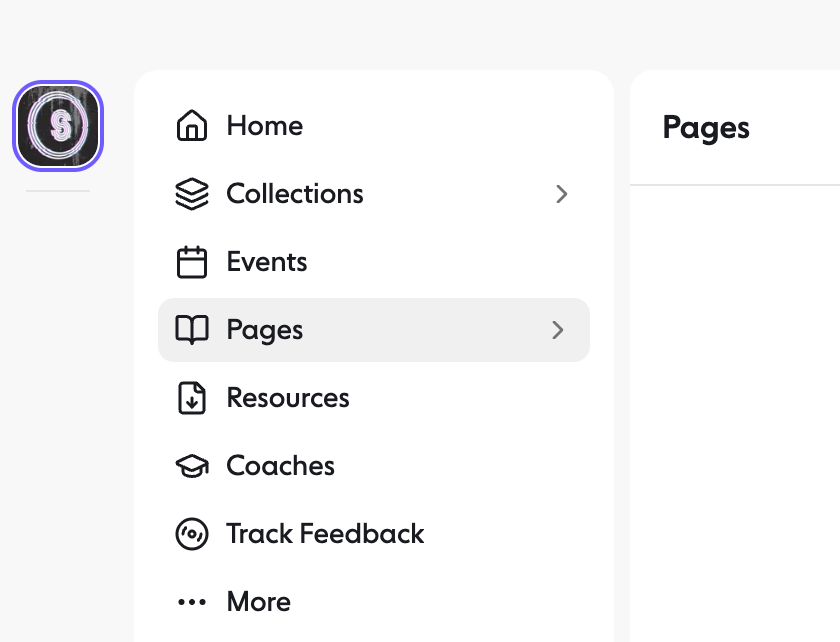 Track Feedback is shown in the side menu, near the bottom of the main navigation.
What kind of feedback will I receive?
Your coach will listen carefully and provide detailed, timestamped guidance. This can cover arrangement, sound selection, groove, mix balance, low end, energy, transitions and the most useful next steps. The aim is to give you a clear plan for improving the track, rather than a vague list of opinions.
How quickly will I receive feedback?
Standard feedback is normally returned within five working days. Express feedback is normally returned within 24 hours. Turnaround begins when your submission is successfully received through Trackstack.
Do unused feedback tokens roll over?
No. Included feedback tokens expire at the end of the relevant billing period, so it is worth using them before your next renewal date.
Can members without included tokens still request feedback?
Yes. Members on an eligible plan can purchase individual feedback when needed. Check the current membership page ↗ for the latest options and availability.
What should I do if a token is missing or my upload becomes stuck?
Refresh the page once and check whether the submission appears in your account. If the problem continues, email timmy@superseriouscoaching.com ↗ with the email address connected to your membership, the track title and a screenshot of what you can see. Please do not submit repeatedly, as this can create duplicate requests.
Billing and membership
Where do I manage my billing?
Open Billing & Subscription ↗. From here you can see your current subscription, open invoices, manage payment methods and access the available plan controls.
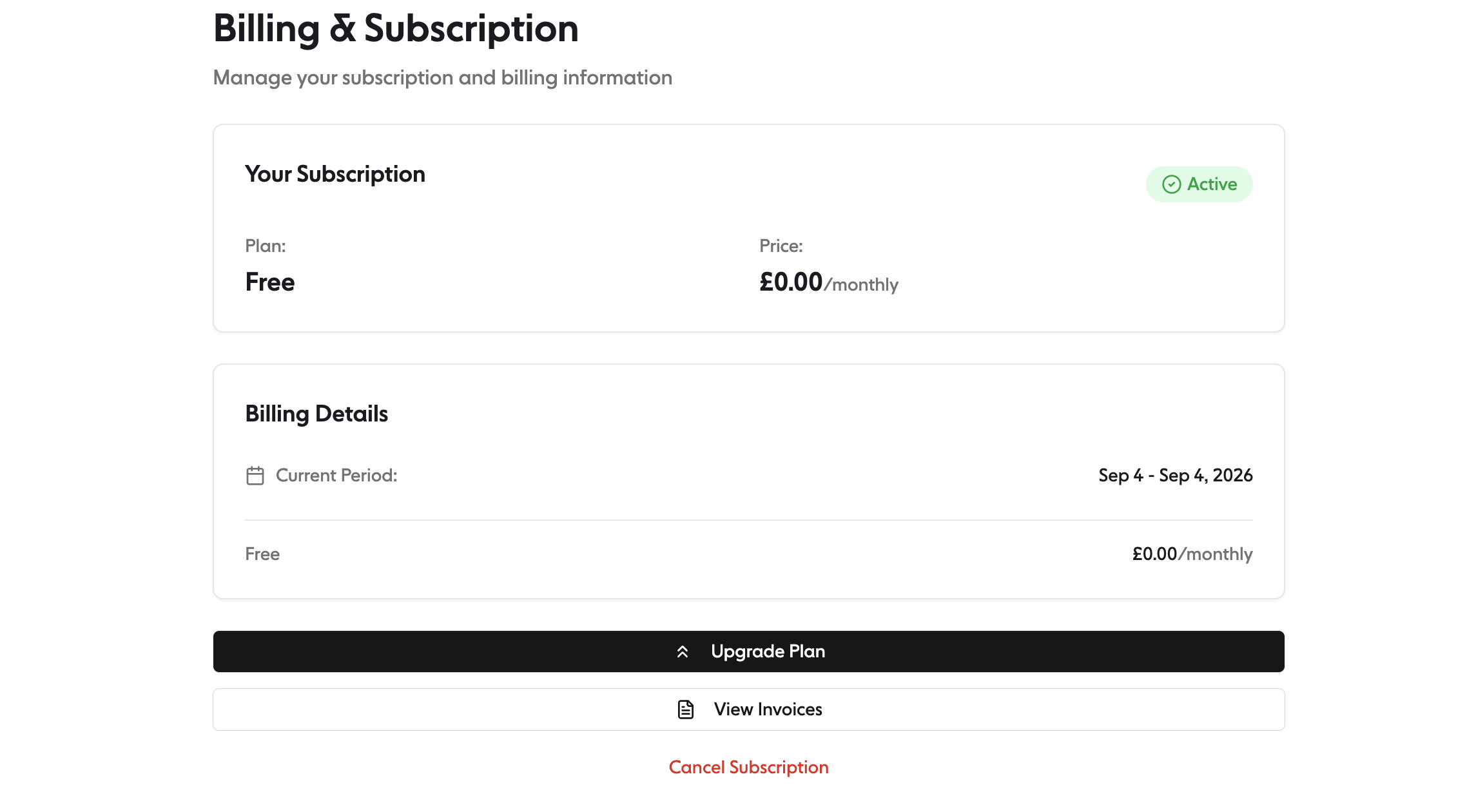 Your subscription controls and saved payment methods are managed together on this page.
How do I add or update my payment details?
- Open Billing & Subscription ↗.
- Scroll to Payment Methods.
- Select Add New or Add Your First Card.
- Enter the card number, expiry date, security code, country and postal code.
- Select Add Payment Method to save it securely.
- If your account shows more than one card and offers a default-card option, check that your preferred payment method is selected.
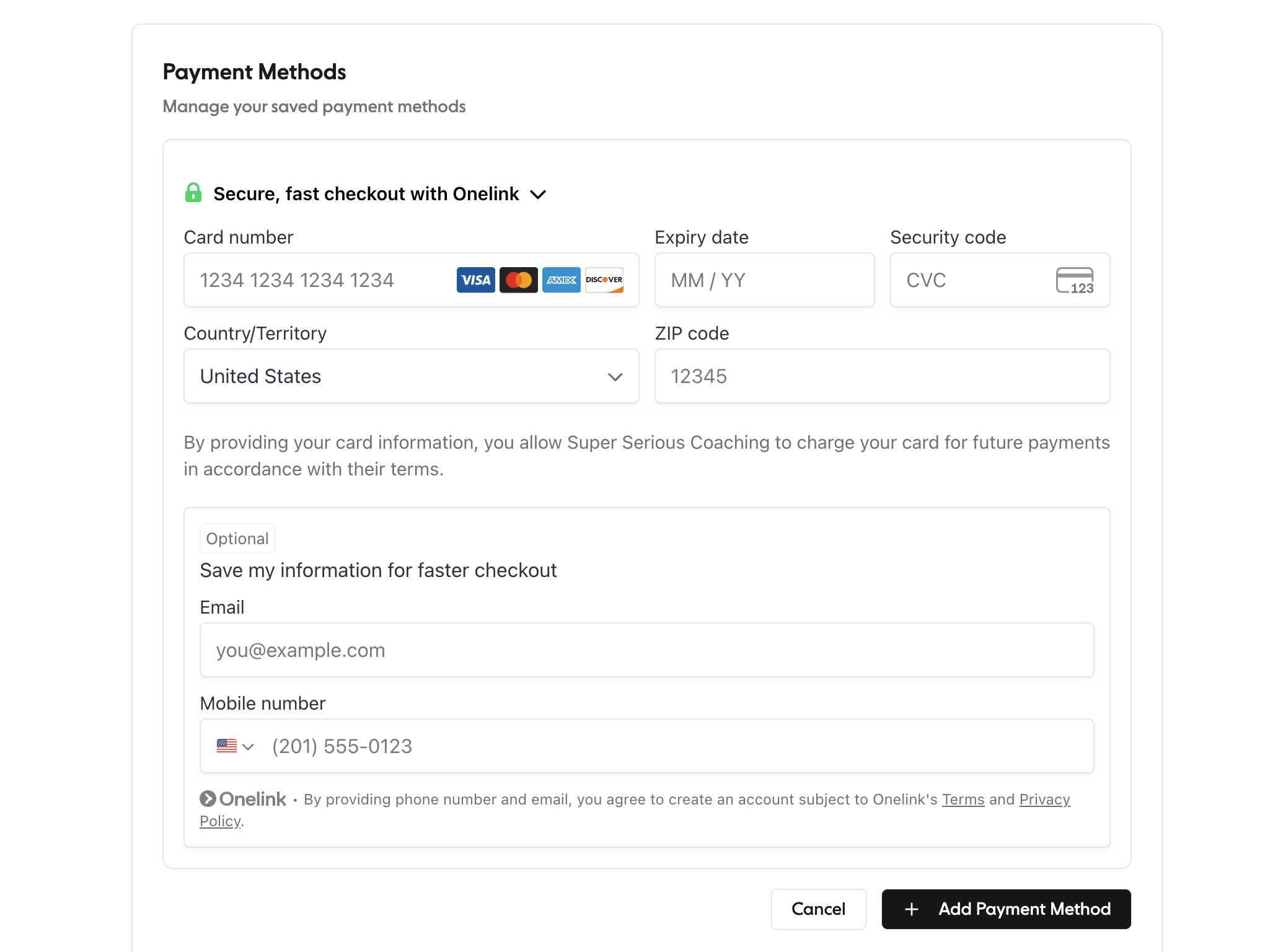 Payment information is handled securely by Stripe. SSC does not display your complete card number.
Does the 15% loyalty discount combine with annual billing?
Yes. After six months of continuous active membership, the 15% loyalty discount is applied automatically and currently stacks with annual billing, so eligible annual members receive both savings together. See the current membership page ↗ for the latest offer details.
Where can I find my invoices?
In Billing & Subscription, select View Invoices. Your available invoices and receipts can be opened from there.
How do I change my membership?
Open Billing & Subscription and select Upgrade Plan, or use the plan-management option shown in your account. If you have one-to-one coaching or the change you need is not available there, email timmy@superseriouscoaching.com ↗.
How do I cancel my membership?
Open Billing & Subscription and select Cancel Subscription. Access normally continues until the end of the period you have already paid for. Chilled and Feedback memberships can be cancelled at any time; one-to-one coaching requires one month’s notice. Please read the Terms & Conditions ↗ for the full cancellation terms.
Can I request a refund?
Refund eligibility depends on the circumstances and the applicable membership terms. Review the Terms & Conditions ↗, then email timmy@superseriouscoaching.com ↗ if you need help with a particular payment.
What should I do if a payment fails?
Add or update your payment method in Billing & Subscription, then contact timmy@superseriouscoaching.com ↗ if your account does not update or you are still unable to access your membership.
Account, community and support
I cannot access content that should be included in my membership. What should I do?
First, sign out and back in using the same email address connected to your paid membership. If the content is still locked, email timmy@superseriouscoaching.com ↗ with your account email, the page you are trying to open and a screenshot of the message you see.
Where can I find live sessions and community updates?
Check the Events area and SSC community announcements regularly. These contain upcoming session details, guest events and any joining instructions you need.
How can I suggest a tutorial topic?
Email timmy@superseriouscoaching.com ↗ with the topic, the problem you would like the tutorial to solve and, if useful, an example track or reference. Specific requests are especially helpful when planning future content.
Who should I contact?
- Memberships, billing, account access and community support: timmy@superseriouscoaching.com ↗
- Tutorial ideas and educational content: timmy@superseriouscoaching.com ↗
What information should I include when reporting a technical problem?
- The email address connected to your SSC account.
- The page or feature you were using.
- Your device and browser.
- A short description of what you expected and what happened instead.
- A screenshot or screen recording, provided it does not reveal card details, passwords or other sensitive information.
Where can I read the policies?
You can read the full Terms & Conditions ↗ on the SSC website. If you are unsure how a term applies to your account, contact timmy@superseriouscoaching.com ↗ before making a billing change.